SecureCloud Hub. Azure-native zero-trust file sharing with identity, scanning and short-lived access.
SecureCloud Hub is a production-style Azure serverless platform for secure file sharing. It uses Microsoft Entra ID
sign-in, direct-to-Blob uploads with short-lived write SAS, Event Grid triggered malware scanning, clean/quarantine
storage separation, and short-lived read-only SAS downloads for approved files only.
Many teams still move sensitive files using emailed attachments, public blob URLs, or long-lived shared SAS tokens.
SecureCloud Hub demonstrates a stronger Azure-native pattern: users authenticate with Microsoft Entra ID, upload
directly to private Blob Storage using short-lived write SAS, files are scanned automatically, and only clean files
become downloadable through short-lived read-only SAS URLs.
The pattern
Zero-trust file distribution, from upload to download.
Files never sit in public containers. The browser never sees account keys. Uploads land in an untrusted
container, Event Grid triggers the scan pipeline, and only clean files in safe-files are eligible
for user-scoped SAS downloads.
Microsoft Entra ID sign-in is enforced with Easy Auth before frontend or API access.
Uploads use short-lived write SAS and go directly from browser to Blob Storage.
All uploaded content first lands in incoming-raw, never directly in clean storage.
scan_function moves clean files to safe-files and infected files to quarantine.
download_function validates identity and scanStatus=clean before issuing download SAS.
Key outcomes
Identity-first, serverless, and audit-friendly.
The platform is built as a realistic Azure reference implementation for zero-trust file handling, with strong
coverage across IaC, automation, identity, storage security, and operational monitoring.
SecureCloud Hub translates security engineering into practical business outcomes by reducing unsafe file-sharing risk,
improving auditability, and enforcing identity-first access across the full upload, scan, and download workflow.
Reduced the risk of malware distribution by enforcing file scanning before users can download approved content.
Minimized data exposure by issuing short-lived SAS URLs for uploads and downloads instead of permanent public links.
Improved compliance readiness through audit-friendly logging of upload, scan, quarantine, and download events.
Eliminated storage key exposure risk by using Managed Identity, RBAC, and passwordless GitHub Actions OIDC deployment.
Enabled secure internal file sharing without relying on email attachments, public blob access, or long-lived shared links.
Improved operational control by separating untrusted uploads, clean files, and quarantined files into dedicated private containers.
Zero-trust principles & capabilities
Zero Trust by Design
SecureCloud Hub uses private storage, enforced sign-in, managed identity, time-limited SAS, and a full
content-safety pipeline. Every stage reduces implicit trust and narrows the blast radius of a leaked link,
invalid upload, or misrouted request.
Zero-trust principle
Private by default
Storage accounts disable anonymous blob access. All containers are private, and the only valid data paths
are through short-lived upload SAS or authenticated download requests.
Private Blob StorageNo public blob URLs
Zero-trust principle
Identity-first access
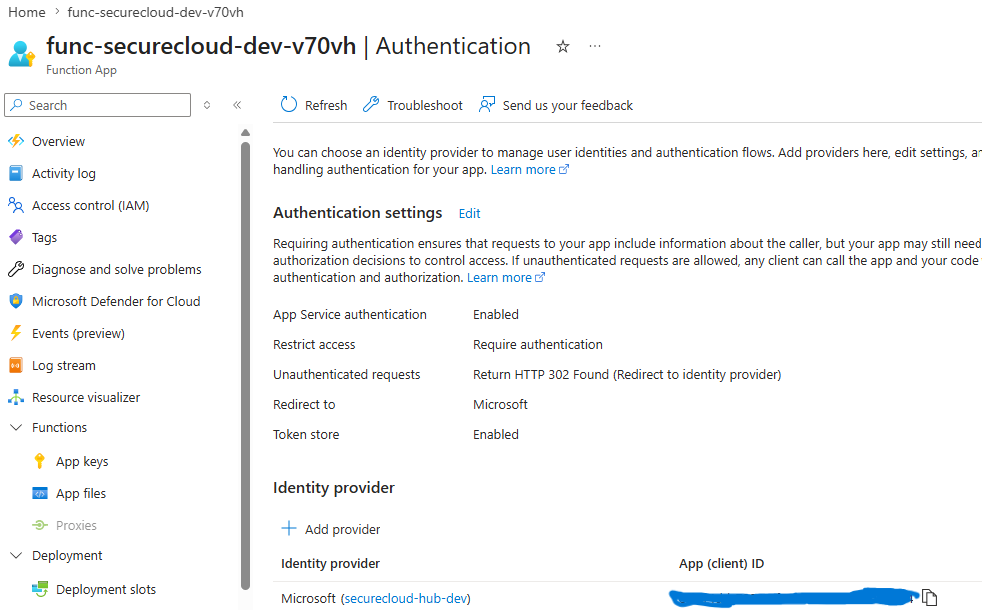
Easy Auth with Microsoft Entra ID is enabled on the Function App. Unauthenticated users are redirected to
sign in before they can reach the frontend or APIs.
Easy Auth enforcedX-MS-CLIENT-PRINCIPAL
Zero-trust principle
Least-privilege, short-lived access
Uploads use write-only SAS with a short expiry window. Downloads use read-only SAS after backend checks.
Access is per-file and time-bounded, not broad or permanent.
Write SAS (10 min)Read SAS (15 min)Per-file scope
Content safety
Event-driven malware scanning
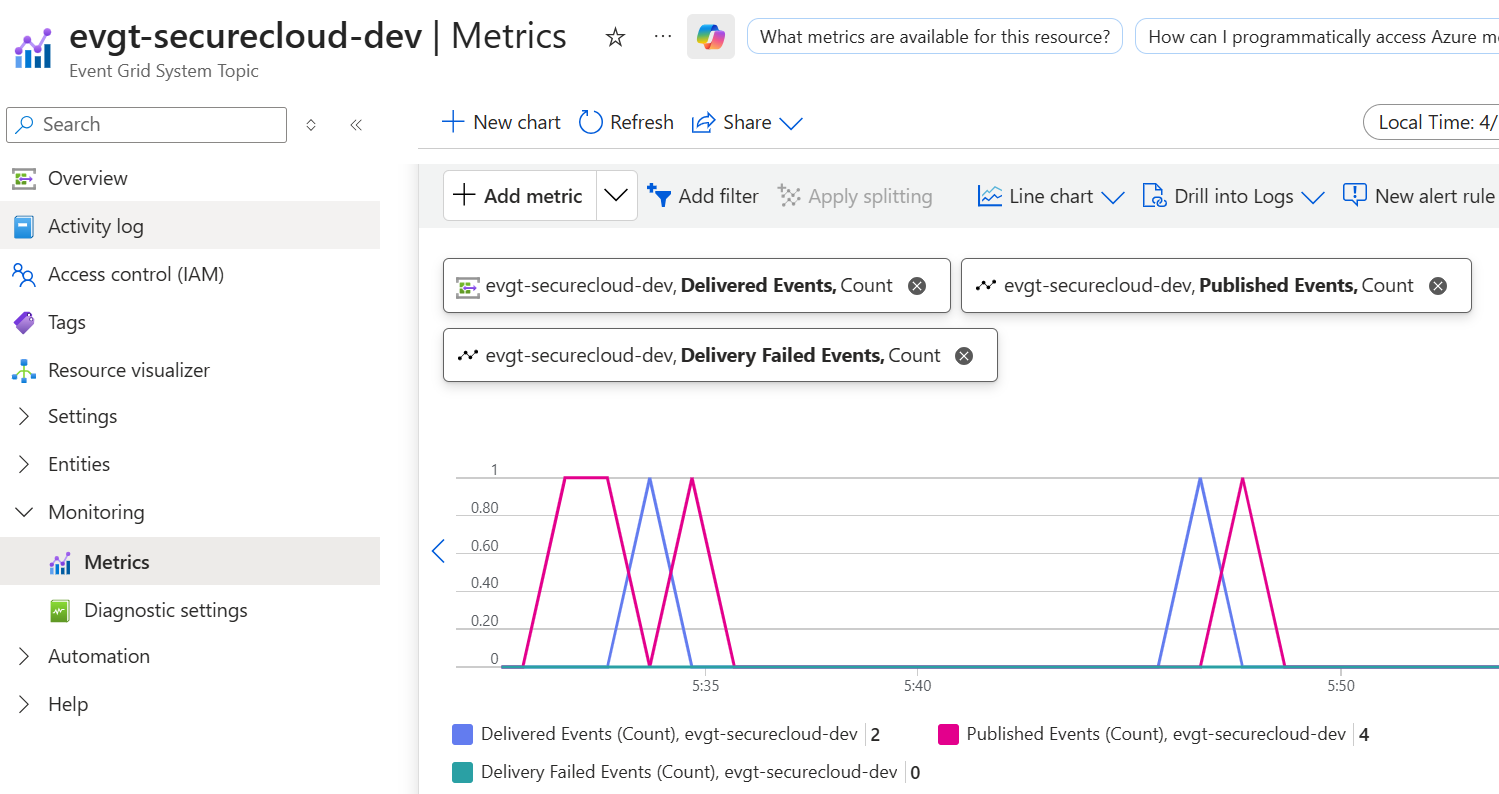
Uploads are treated as untrusted input. Event Grid detects new blobs in incoming-raw and
triggers scan_function, which adds scan metadata and promotes or isolates content.
Versioning and retention policies help protect data from accidental deletion and control costs, while
quarantine content is purged on a shorter schedule than clean files.
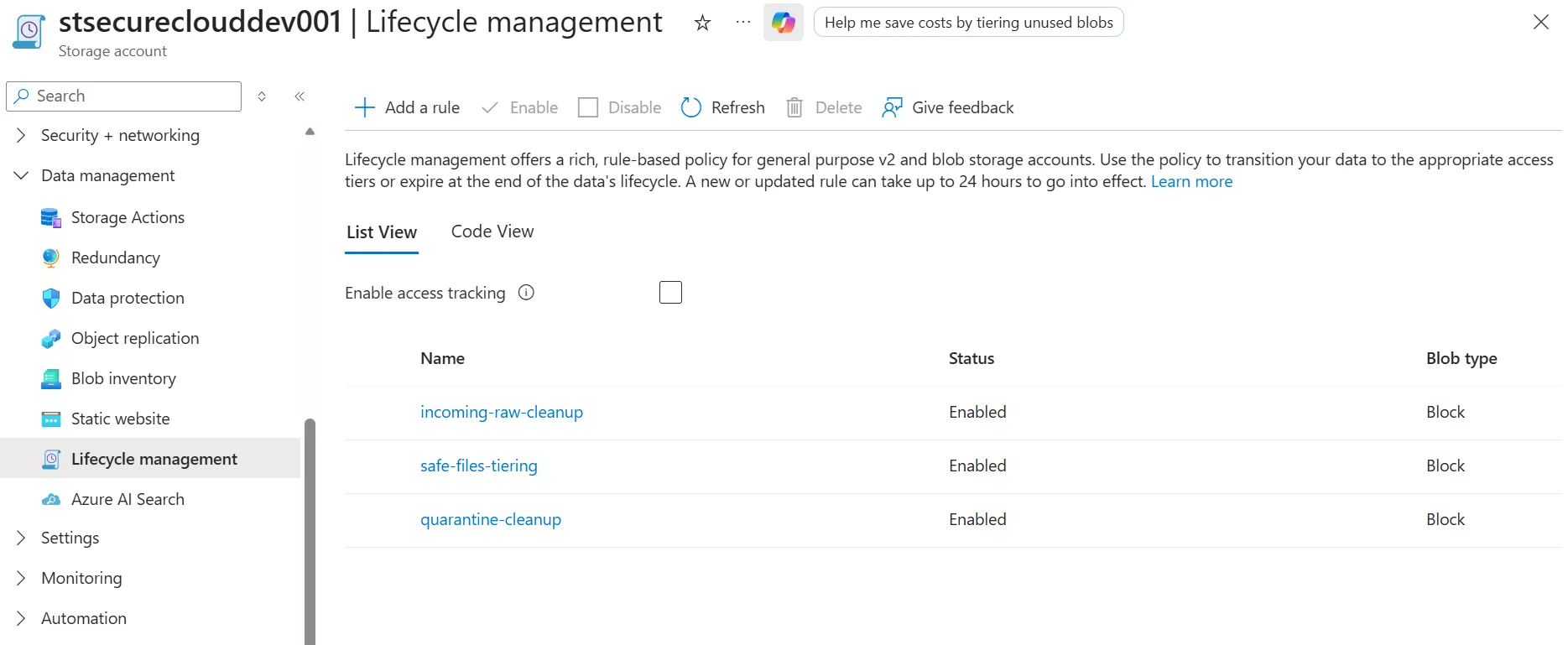
VersioningSoft deleteLifecycle rules
Platform feature
IaC + passwordless CI/CD
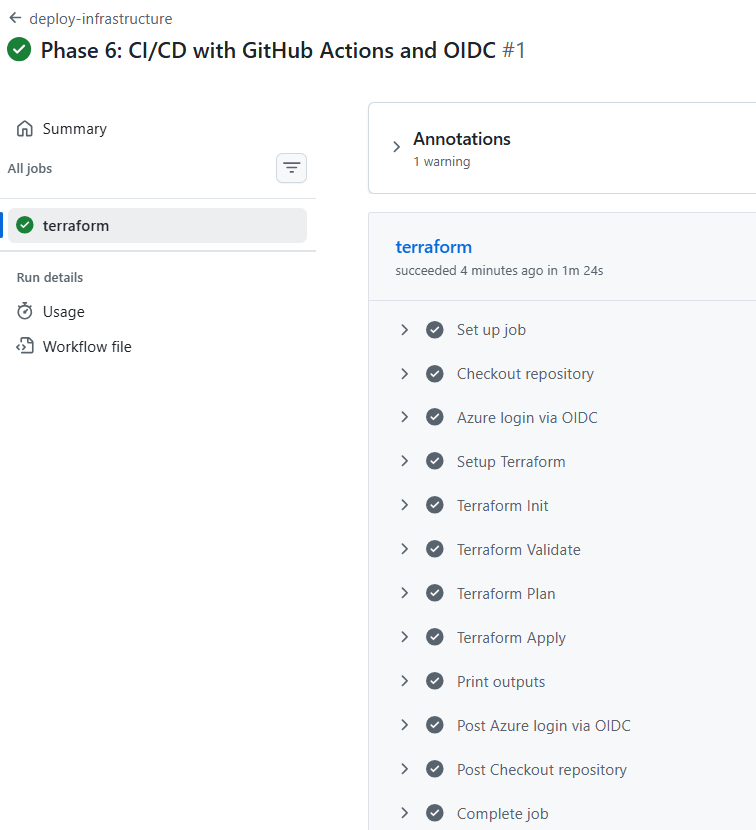
Terraform provisions the platform, and GitHub Actions deploys it using OpenID Connect federation. There are
no long-lived pipeline secrets or storage keys embedded in the application flow.
SecureCloud Hub is built from discrete Azure components that map directly to real deployed resources and real
Python Functions. The platform is fully rebuildable through Terraform and mirrors a production serverless design.
Logical components
1
GitHub Actions CI/CD
deploy-infrastructure · deploy-application
GitHub Actions deploys infrastructure and Function code using OIDC federation, avoiding long-lived Azure credentials.
OIDC loginInfra / app separation
2
Terraform IaC layer
Resource Group · Storage · Function App · Event Grid · Monitoring
Terraform provisions the storage account, containers, Flex Function App, Event Grid subscription, monitoring resources, and RBAC assignments.
3
Frontend + Easy Auth
frontend Function + Microsoft Entra ID
The frontend is served through the Function App, and Easy Auth forces Microsoft sign-in before users can see files or request operations.
frontendEasy Auth
4
Upload SAS issuer
request_upload_function
The backend creates a short-lived write-only SAS URL for the authenticated user, scoped to their blob path in incoming-raw.
Files move across private containers according to trust state. Clean files never mix with unscanned or infected content.
6
Event Grid + scan_function
BlobCreated → scan pipeline
Event Grid watches incoming-raw and triggers scan_function when new uploads arrive.
7
Clean file listing
list_function
The frontend retrieves only the authenticated user's clean files from safe-files, using user-scoped blob paths.
8
Secure download SAS generator
download_function
The backend checks identity, blob existence, and scanStatus=clean, then issues a short-lived read-only SAS URL.
9
Monitoring & observability
Application Insights · Log Analytics
Logs capture upload SAS issuance, scan execution, clean/infected outcomes, and secure download activity for troubleshooting and auditability.
End-to-end workflow (high-level)
1
User signs in with Microsoft
The browser accesses the Function App frontend and is authenticated through Easy Auth with Microsoft Entra ID.
2
User requests upload SAS
The frontend calls request_upload_function, which returns a short-lived write-only SAS URL.
3
Browser uploads directly to Blob
The selected file is uploaded directly into incoming-raw/<user-id>/filename without streaming through the Function App.
4
Event Grid triggers scan
BlobCreated events from incoming-raw invoke scan_function.
5
File is scanned and tagged
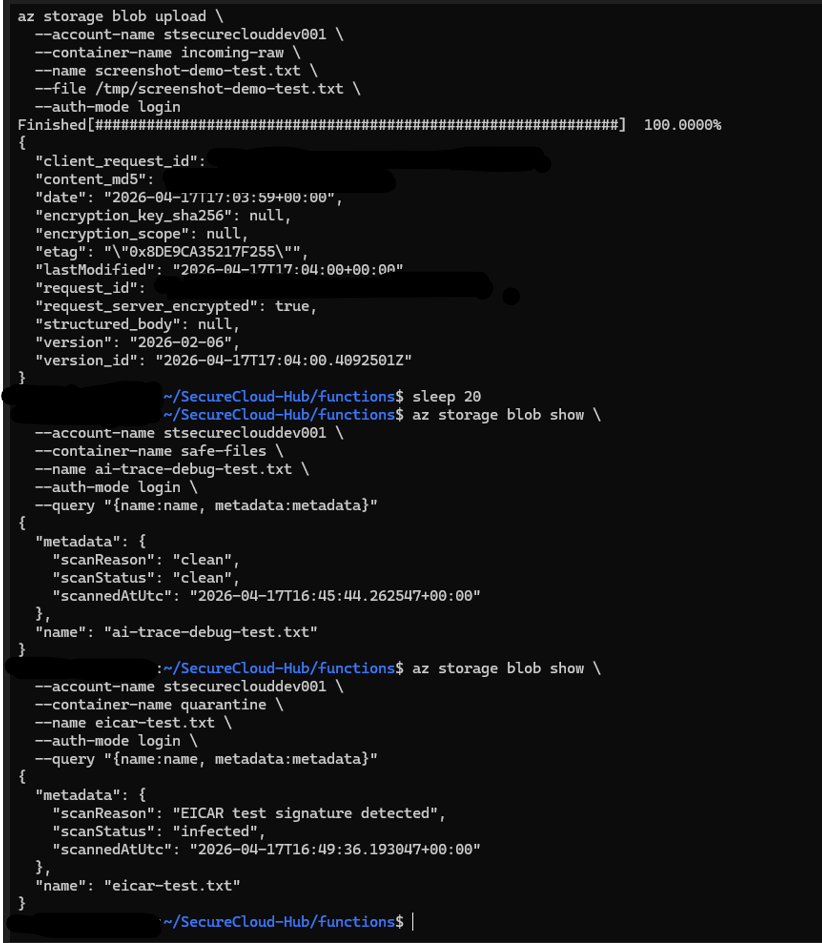
The scan pipeline writes metadata including scanStatus, scanReason, and scannedAtUtc.
6
Promote or quarantine
Clean files move to safe-files. Infected files move to quarantine.
7
User refreshes clean file list
The frontend calls list_function and shows only clean files belonging to the authenticated user.
8
User requests secure download link
download_function validates the blob and generates a short-lived read-only SAS URL if the file is approved.
9
Browser downloads from Storage
The user downloads the file directly from Blob Storage, and the link expires automatically after the SAS window.
Security controls & hardening
Defense-in-Depth Architecture.
SecureCloud Hub layers security across identity, storage, application flow, and operations. It minimizes shared
secrets, enforces private-by-default storage, and prevents unscanned content from ever being treated as trusted.
Storage hardening
Storage account public blob access is disabled and all containers remain private.
Files are separated into incoming-raw, safe-files, and quarantine containers.
CORS is scoped so the frontend can upload directly to Blob Storage with SAS, without opening broad origins.
Lifecycle rules manage retention and cleanup for raw, safe, and quarantined content.
Identity-first access
Easy Auth blocks unauthenticated access before any application code runs.
The backend derives user identity from platform headers rather than trusting user-supplied identifiers.
Managed Identity + RBAC replace connection strings and account keys for storage access.
User-scoped blob paths ensure users only list and download their own files.
Malware & content safety
All uploads are treated as untrusted and land only in incoming-raw.
Event Grid triggers scan_function automatically for new uploads.
The scan pipeline writes metadata and promotes only clean content.
download_function refuses SAS issuance unless scanStatus=clean.
Secrets & CI/CD
GitHub Actions authenticates to Azure using OIDC federation, not stored client secrets.
The live platform minimizes secrets by using Managed Identity and RBAC end-to-end.
Key Vault is optional in this implementation and reserved for future secret-backed integrations.
Terraform keeps infrastructure changes consistent, reviewable, and reproducible.
Future evolution
The current platform already demonstrates strong zero-trust patterns. Future hardening could extend beyond the MVP:
Add Entra ID group-based authorization for more granular sharing rules.
Use private endpoints or Application Gateway / WAF for additional network isolation.
Expand monitoring queries and alerts for suspicious download or upload patterns.
Introduce an admin workflow for quarantine review and operational approvals.
Screenshot gallery
Key Highlights of SecureCloud Hub.
These screenshots mirror the real system: architecture, authentication, storage layout, event-driven scanning,
Function code, CI/CD, monitoring, and the working client experience.
Key screenshot
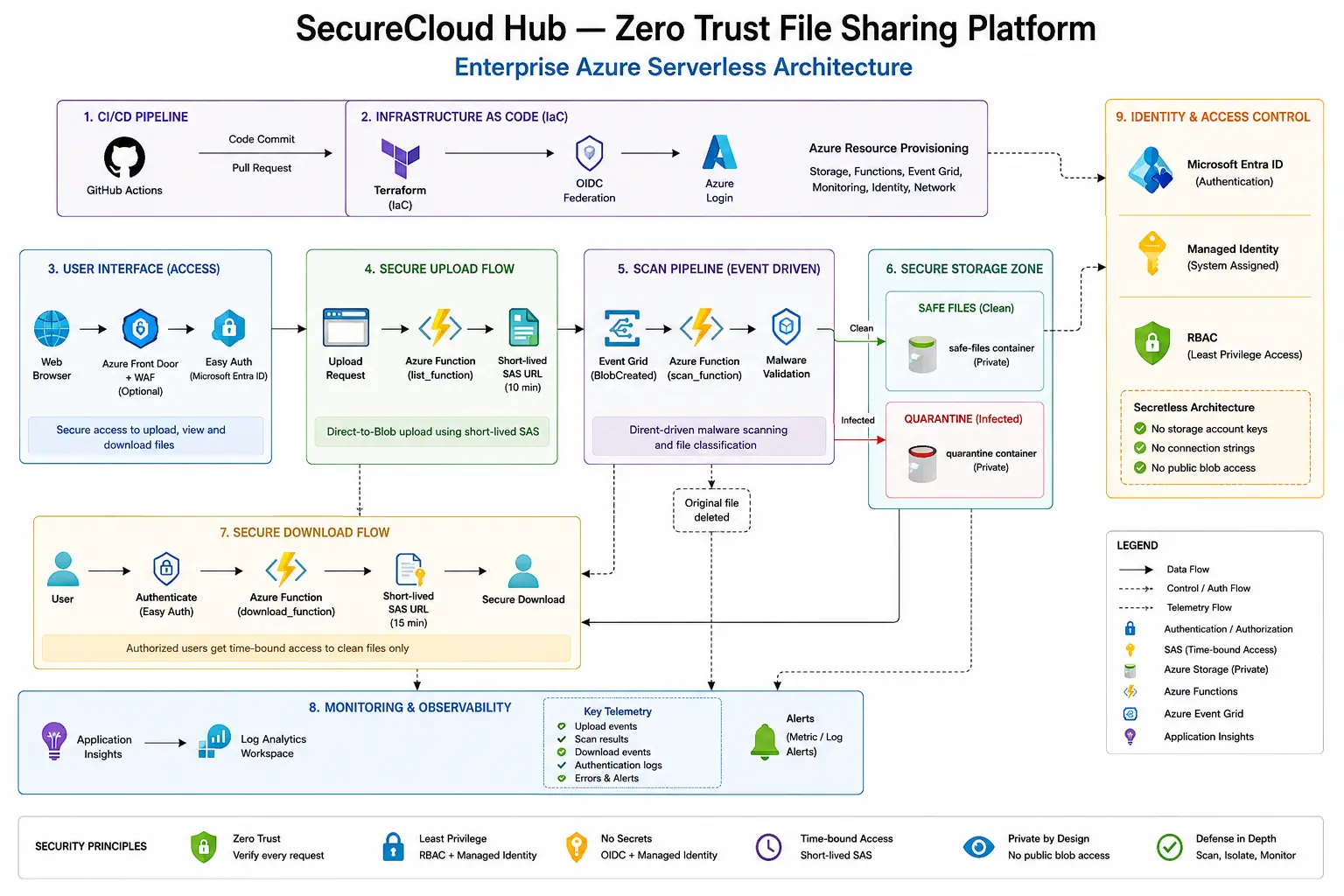
Architecture diagram
Overall system flow from CI/CD through upload, scan, storage separation, and secure download.
Key screenshot
Easy Auth configuration
Shows identity-first access enforced before frontend or API requests reach code.
Key screenshot
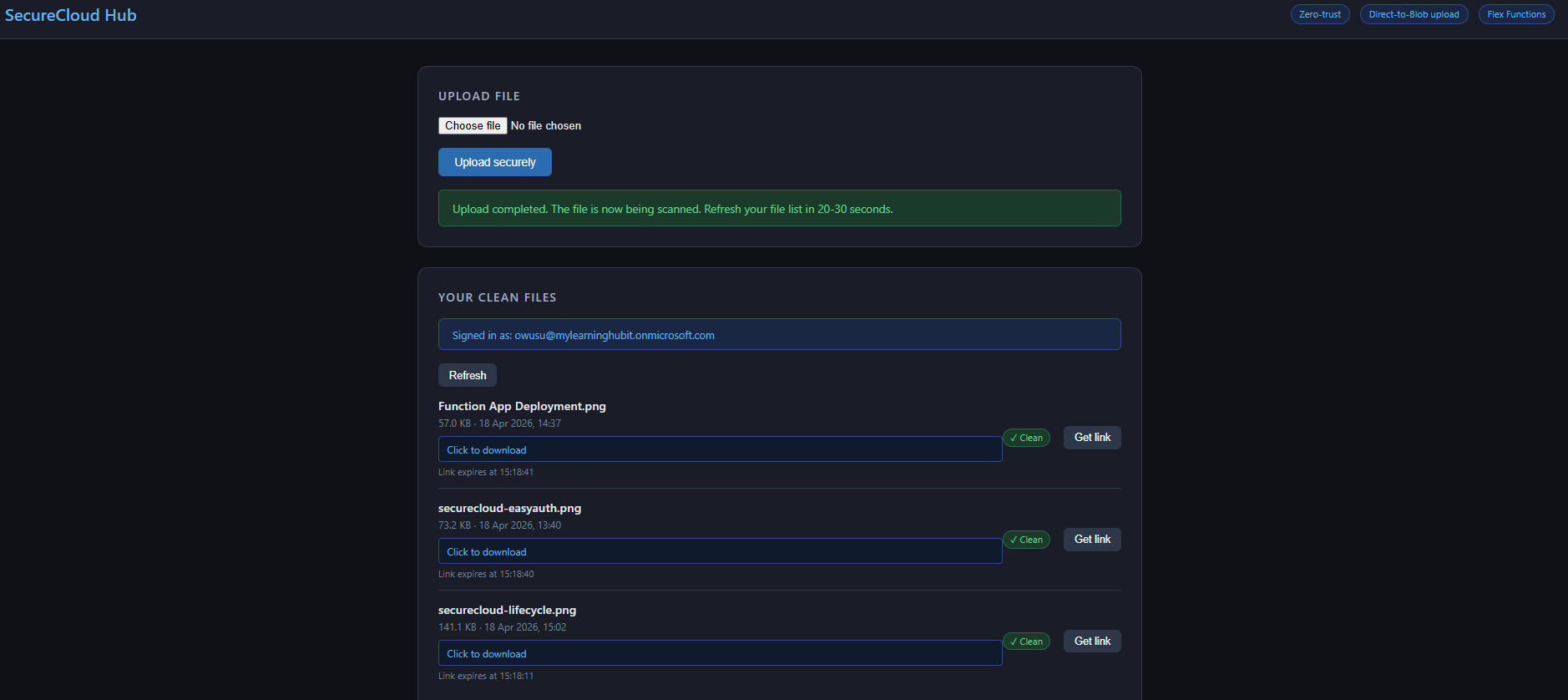
Client UI
Working frontend for upload, clean file list, and secure download.
Key screenshot
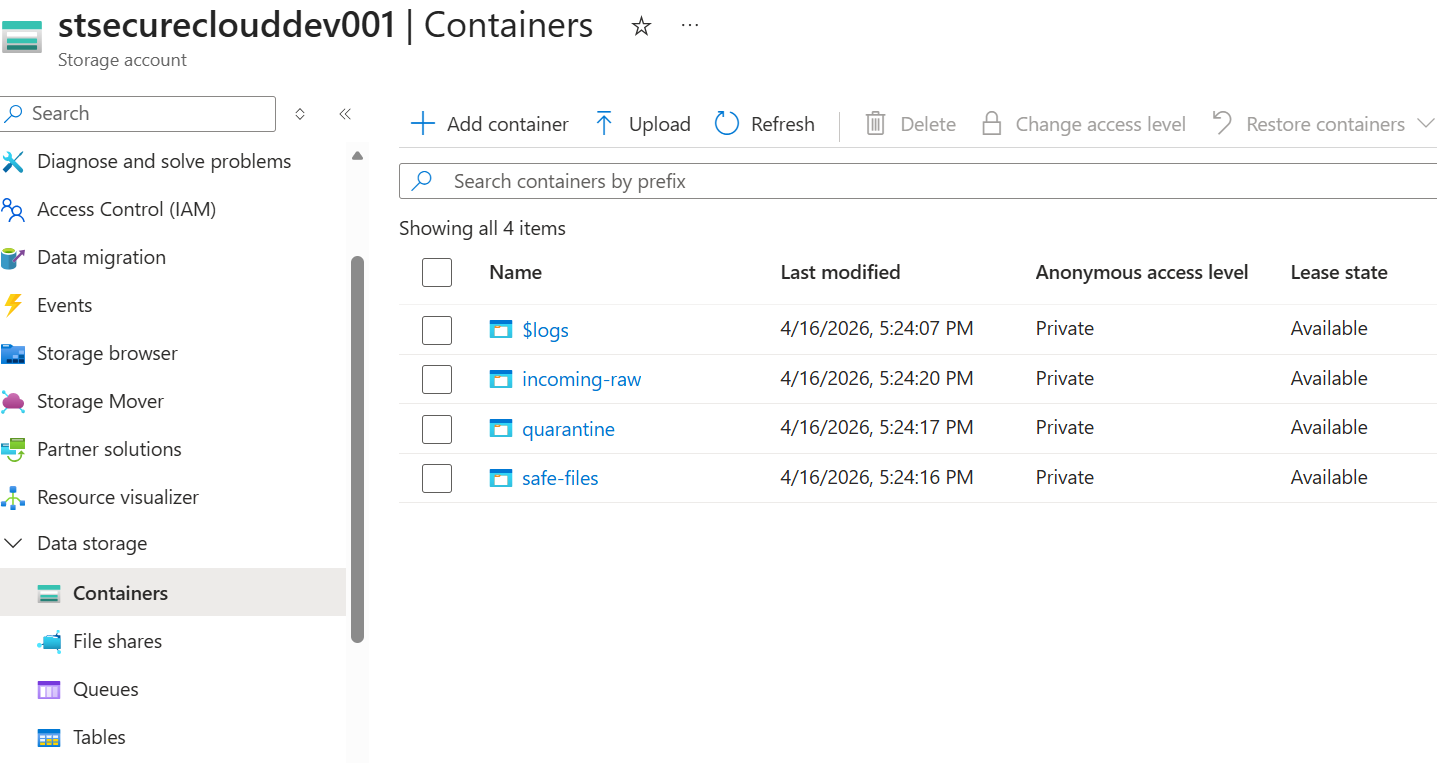
Container layout
The trust boundary between untrusted uploads, clean files, and quarantined content.
Key screenshot
Versioning & lifecycle
Shows resilience and retention management at the storage layer.
Key screenshot
Event Grid → Scan Function
Shows the event-driven trigger path from upload to scanning.
Key screenshot
Scan Function implementation
Code-level proof that the scan pipeline is implemented, not just diagrammed.
Key screenshot
CI/CD pipelines
Passwordless deployment with GitHub Actions and OIDC.
Key screenshot
Terraform stack
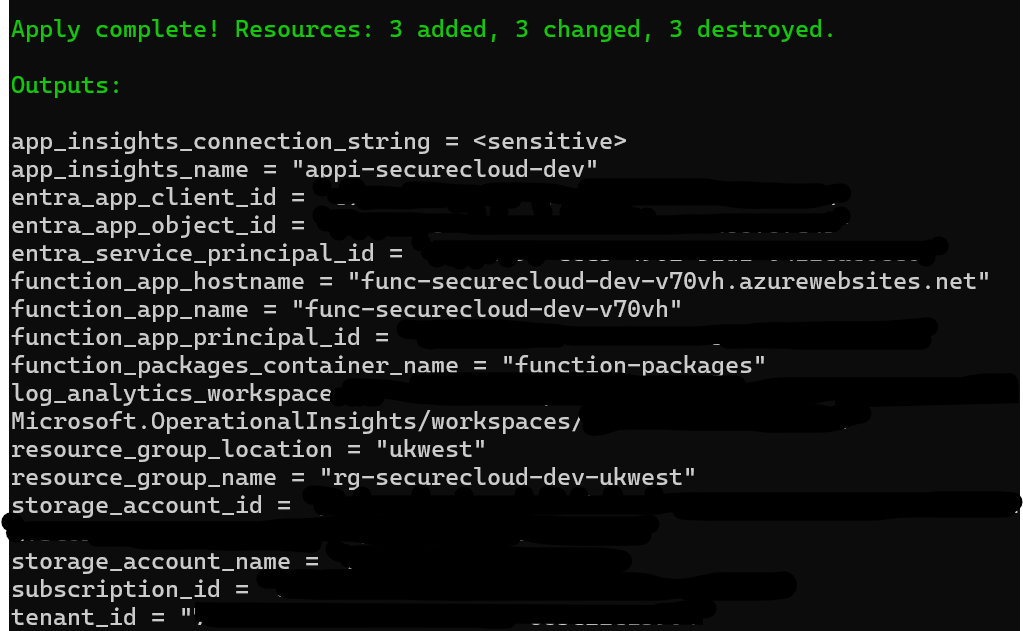
Evidence that the platform is provisioned and maintained as code.
Key screenshot
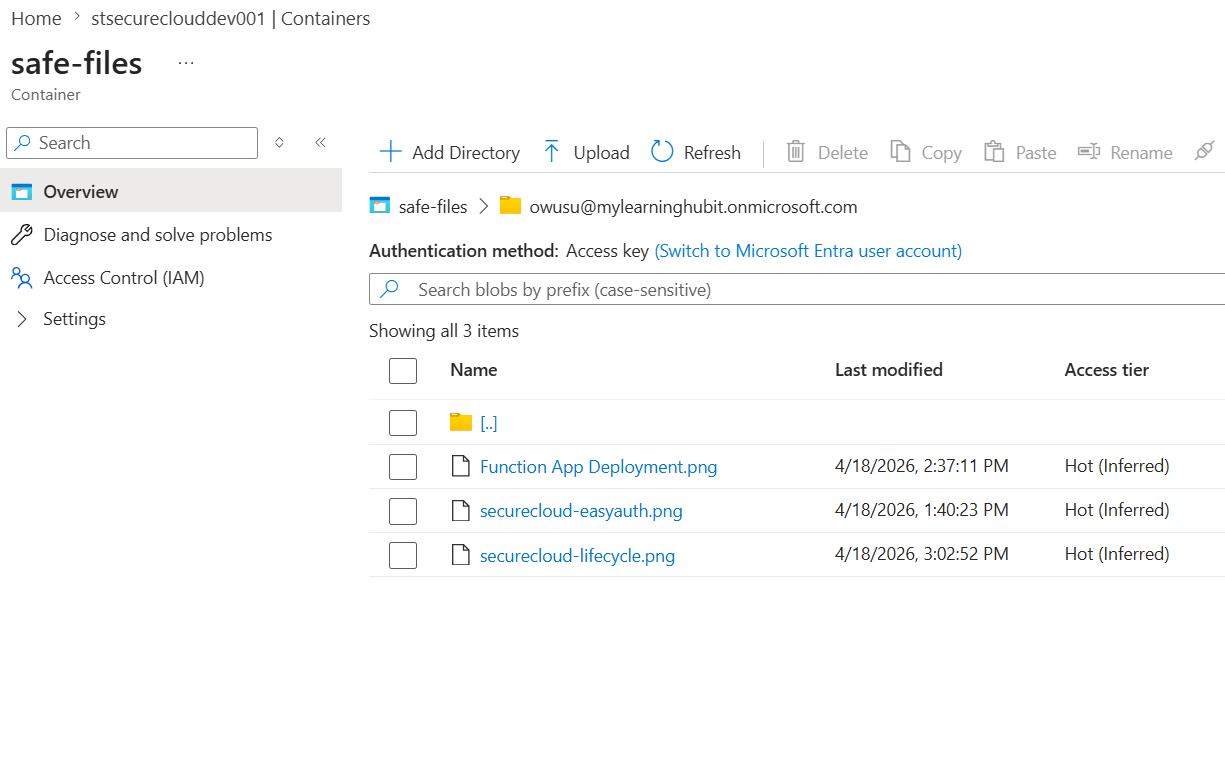
Safe Files Container (Clean Uploads)
Verified clean files stored in the safe-files container after successful malware scanning and metadata validation.
Key screenshot
Download API Function
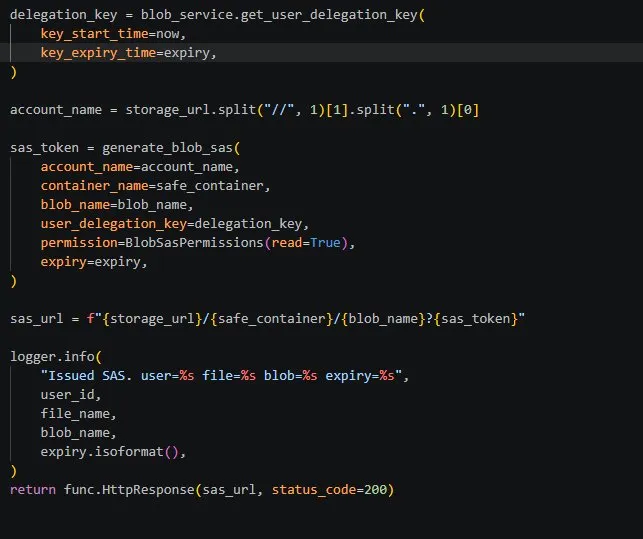
Where identity, authorization, clean-file checks, and SAS issuance intersect.
Key screenshot
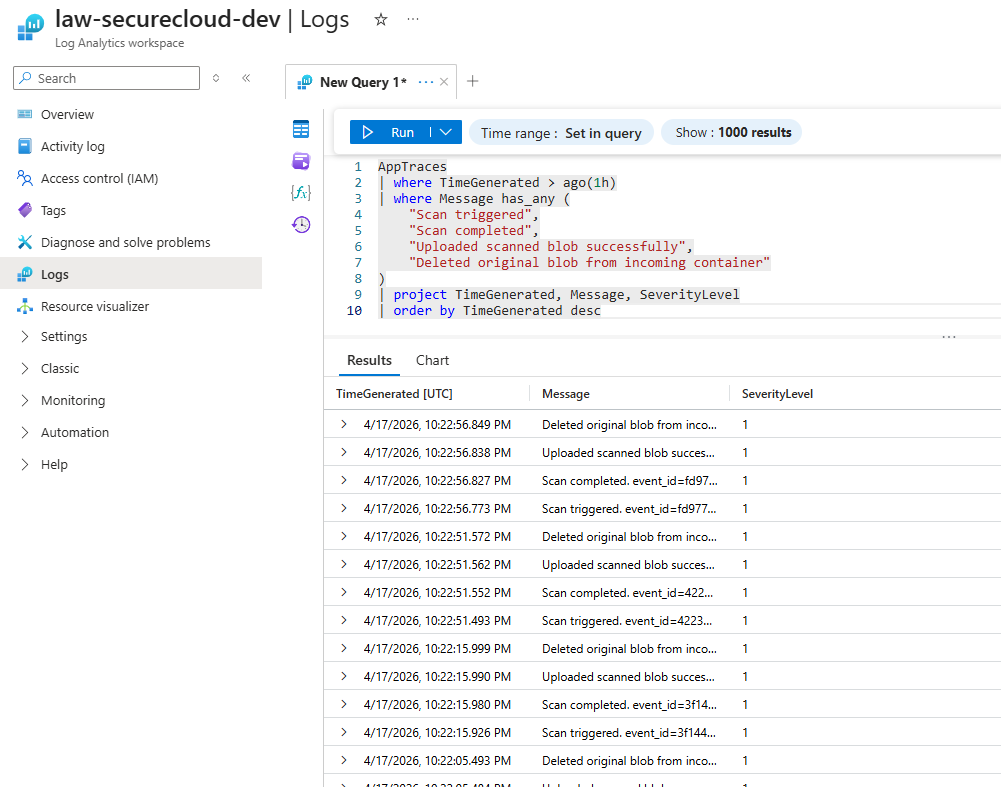
Audit logs
Operational traces centralized for observability and investigation.
Demo – end-user experience
How SecureCloud Hub Works
Try the portal below. Select any file to simulate the full zero-trust flow: SAS generation, direct-to-Blob
upload, Event Grid malware scanning, and secure download link creation. No real files are uploaded and no
Azure storage or cost is involved.
This project involved real architecture changes, real runtime debugging, and several production-style fixes.
The strongest lessons came from evolving the design, not from copying a static template.
Switching from streamed uploads to direct-to-Blob upload SAS
›
Initially, a simpler upload-through-function pattern would have worked, but the stronger architecture is to issue an upload SAS and let the browser upload directly to Blob Storage.
Benefit: lower Function App load and more scalable upload handling.
Trade-off: required Storage CORS and tighter browser-side flow design.
Outcome: enterprise-grade upload path using short-lived write SAS.
Getting user-scoped blob paths correct end-to-end
›
The frontend and backend needed to agree on the difference between display names and real blob paths.
The UI shows the base file name.
The backend rebuilds the real blob path internally using the authenticated user's identity.
This prevents cross-user access attempts and keeps the trust boundary in the backend.
Reworking infrastructure for Flex Consumption
›
Migrating to Flex Consumption changed how the Function App had to be provisioned and configured.
Flex-specific configuration is different from classic Linux Consumption.
Some app settings and site config patterns had to be removed or changed.
Event Grid wiring and deployment flow had to be validated again after migration.
Solving real runtime issues in Event Grid and Easy Auth
›
The biggest engineering value came from troubleshooting real integration issues.
Event Grid subscriptions had to be recreated after infrastructure changes.